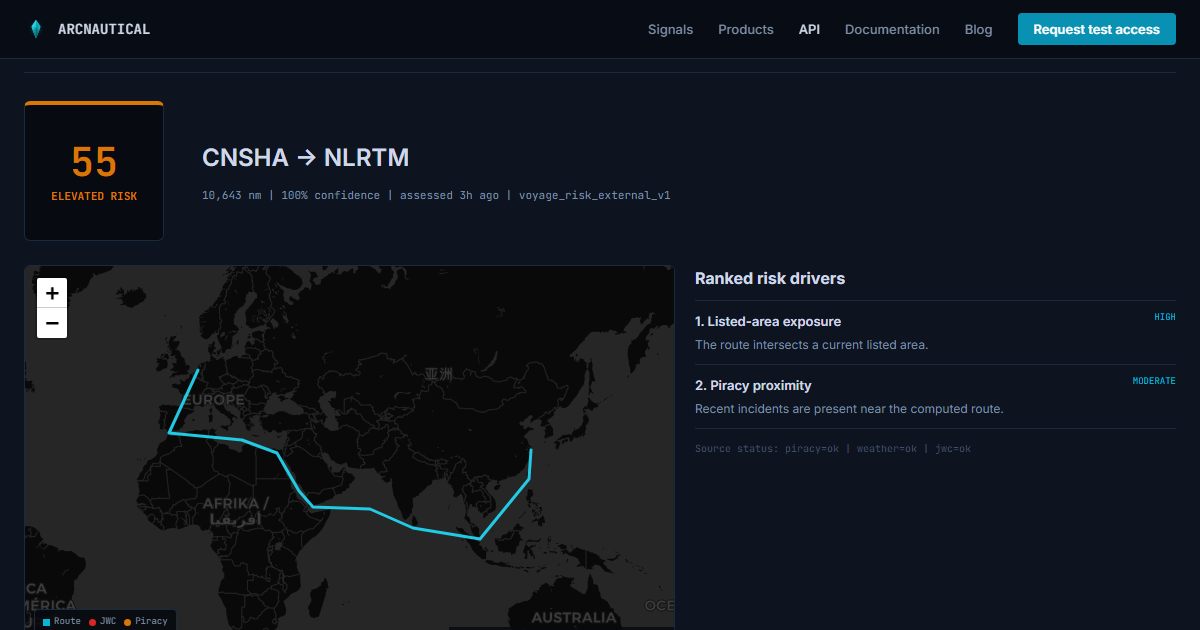
A shipment record usually knows its origin, destination, planned dates, carrier, and mode. It rarely knows whether the sea leg crosses a listed war-risk area, runs near recent piracy incidents, or depends on a chokepoint under active disruption.
That gap matters when a platform has to explain why an ETA became fragile or why two apparently similar routes deserve different treatment. A voyage-risk API can fill it, but only if the integration keeps the evidence attached to the score.
Start with the product decision
Decide where the result changes a user's work. Good first surfaces include a shipment detail page, a route comparison screen, or an exception queue. Running a score without showing it or using it to drive an action just creates another background data feed.
For an initial integration, store four parts of the response:
- The normalized route, including the origin and destination UN/LOCODEs and computed distance.
- The score and risk level at the assessment time.
- The ranked drivers and their source status.
- The confidence, missing sources, and methodology version.
The assessment timestamp is part of the result, not decoration. A score of 55 on Monday and 55 three weeks later are different observations, even if the number has not moved.
Use UN/LOCODEs at the boundary
Port names are messy. A single port may appear under a city name, terminal name, local spelling, or internal customer code. Normalize your locations to five-character UN/LOCODEs before calling the API and keep your internal identifier as customer_reference.
{
  "customer_reference": "shipment-88421",
  "route": {
    "origin": { "locode": "CNSHA" },
    "destination": { "locode": "NLRTM" },
    "vessel_type": "container",
    "load_condition": "laden",
    "speed_knots": 16
  }
}
Keep vessel assumptions inside the route object. They are optional, but explicit assumptions make a result easier to reproduce and audit.
Make the server call replay-safe
API keys belong in your backend or secret manager. Your browser client should call your own application, and your application should call ArcNautical.
const response = await fetch(
  'https://arcnautical.com/api/v1/voyage-assessments',
  {
    method: 'POST',
    headers: {
      Authorization: `Bearer ${process.env.ARCNAUTICAL_API_KEY}`,
      'Content-Type': 'application/json',
      'Idempotency-Key': shipment.assessmentRequestId,
      'X-Request-Id': crypto.randomUUID()
    },
    body: JSON.stringify(request)
  }
);
Use one stable idempotency key when retrying the same assessment. Generate a new key when the route or vessel assumptions change. That distinction prevents a transport retry from creating duplicate work while still allowing a deliberate reassessment.
Store observations, not one mutable score
Do not overwrite yesterday's assessment in place. Store each response as a time-stamped observation and point the shipment to the latest one. This gives you a history for customer support and lets the product show a useful change such as risk moved from moderate to elevated since booking
.
A minimal record needs your shipment ID, the ArcNautical assessment ID, score, risk level, confidence, methodology version, assessed time, and the response body. You can index the scalar fields for filtering while preserving the complete response for audit.
Treat data quality as a visible state
A risk score without confidence is too easy to overstate. If missing_sources is non-empty or a source status is degraded, show that next to the result. Do not silently turn a partial assessment into a definitive green state.
The same rule applies to errors. Validation failures should go to a mapping queue. Rate limits and temporary upstream failures can be retried with backoff when the request has an idempotency key. Authentication and entitlement errors need operator attention.
A practical first release
A useful first release can stay narrow: assess one route when a shipment is created, show the score and top drivers on the shipment page, and reassess when the route changes. Once users rely on that view, add batch import or corridor monitoring where the workflow justifies it.
Before writing integration code, run one of your real port pairs through the public playground. It returns the production assessment shape without retaining a customer result. You can then compare the response with the fields already available in your shipment model.
Test your route before you integrate
Run a real assessment in the API playground, then use the developer documentation for authentication, retries, batches, and webhooks.